
Know when an update breaks your site
Page Guard looks at your pages after every plugin, theme and WordPress update, compares them with the last good version and tells you in plain words what broke.
Free for one site. No card needed.
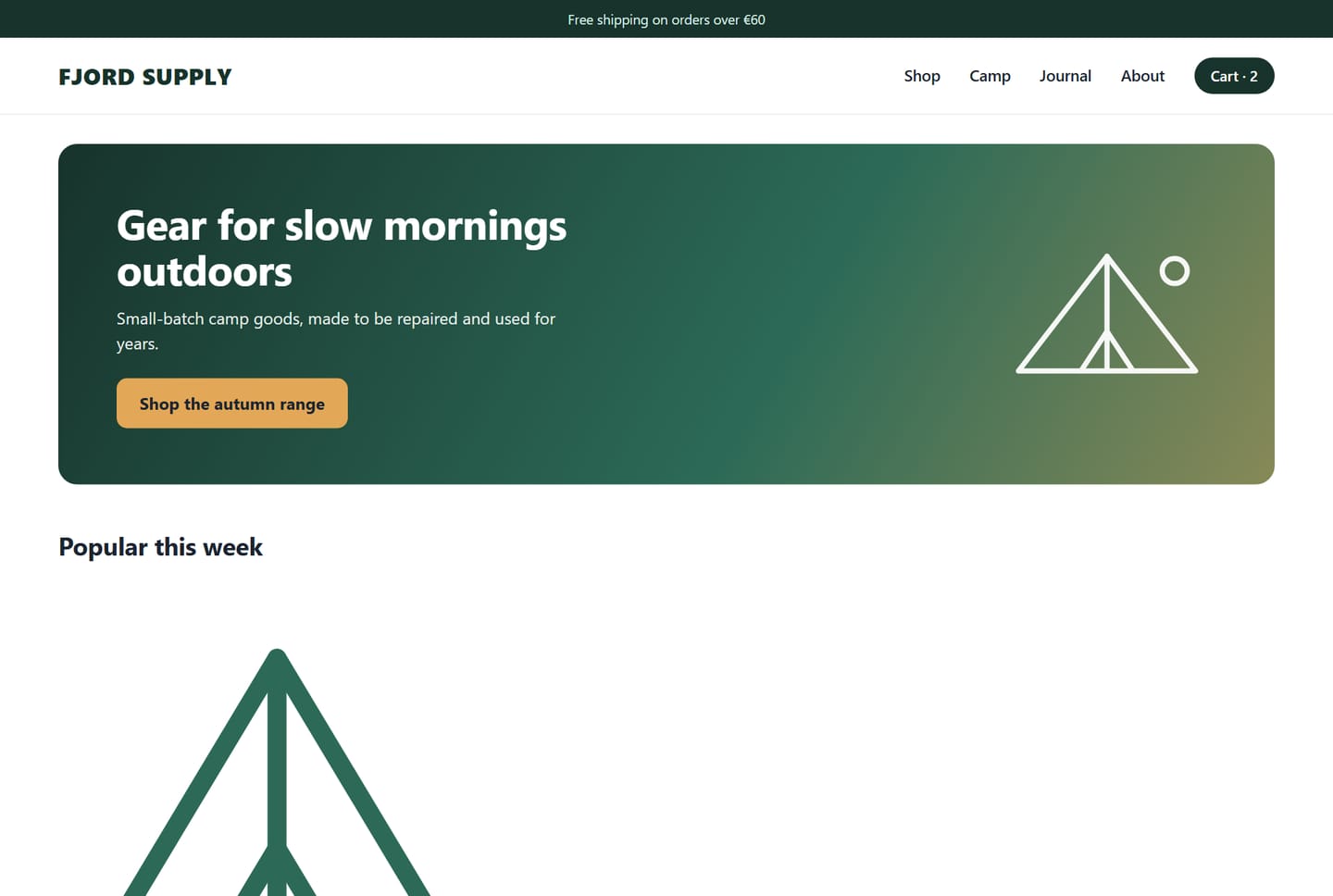
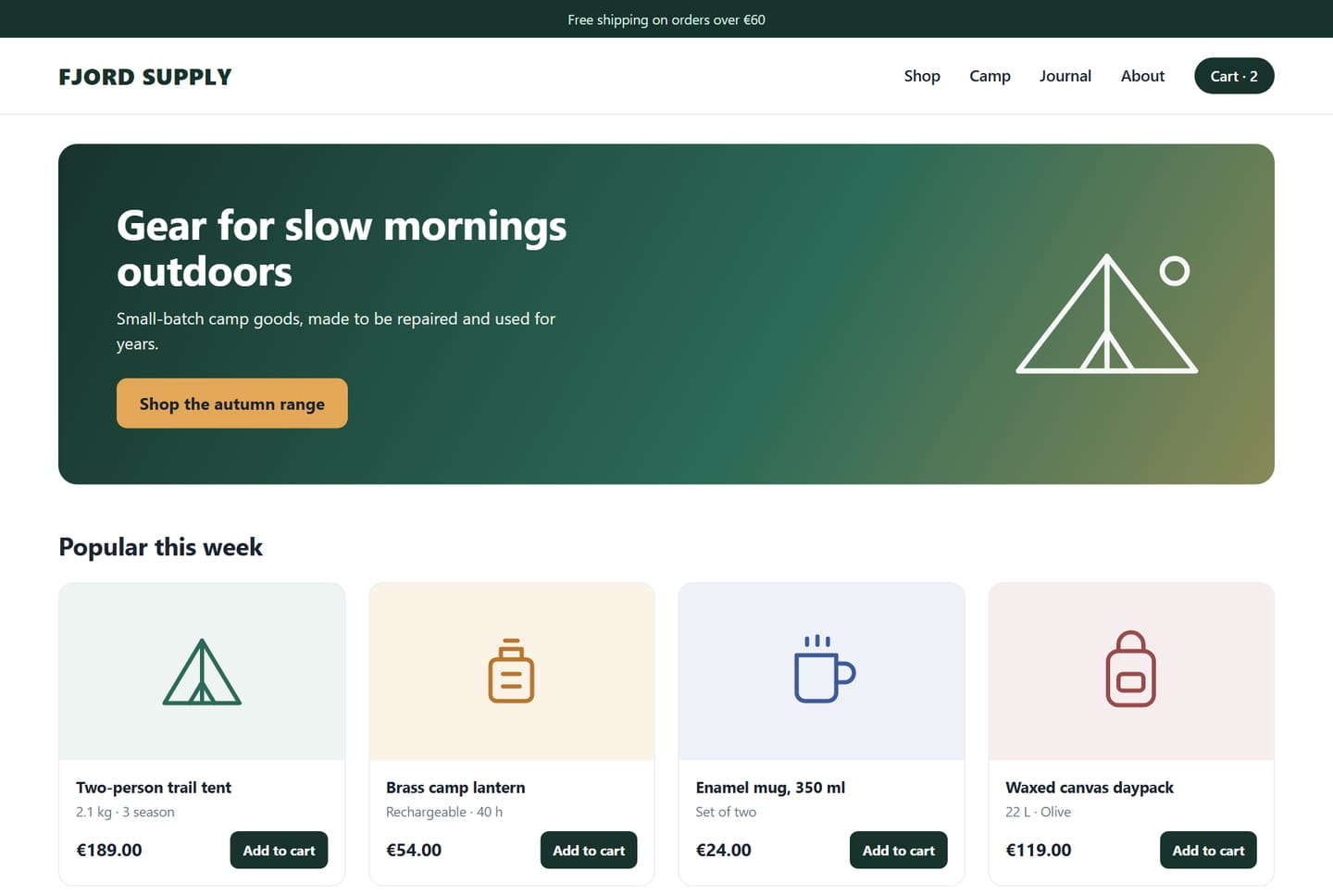 Before the update
Now
The product list lost its layout: the pictures are oversized and the Add to cart buttons are gone.
After a plugin update. Seen in 4 checks in a row.An example with a demo shop. Drag the handle to compare.
How it works
Set it up once. After that it works on its own.
Install and connect
Install the plugin, enter your e-mail and press Connect. The first check starts within a few minutes and becomes the good version to compare with.
Update as usual
After every plugin, theme or WordPress update your pages are checked again, at desktop and at phone size. Checks also run on a schedule and whenever you press Check now.
Get a clear answer
Every page is marked OK, Needs a look or Broken. You see the page before and after, the spot that changed and a short explanation of what went wrong.
What it catches
The things a visitor would notice, and you might not until someone writes to you.
Broken layout
Styles that did not load, a section that vanished, blocks on top of each other, a page wider than the screen.
Shop essentials
A missing Add to cart button, prices that turned into zero, a menu, header or footer that disappeared.
Errors on the page
Server errors, a 404 where a page used to be, PHP warnings printed on the page, the WordPress critical error screen.
Things that did not load
Broken images, stylesheets and scripts that return an error, new JavaScript errors.
Phone and desktop
Every page is checked at both sizes, because many breaks show up only on a phone.
A site that stops answering
If the site goes silent, it is checked from the outside and you get an e-mail. You are also warned before the SSL certificate expires.
It looks four times before it bothers you
A page can look odd for a minute after an update while caches rebuild. Page Guard looks again after 30 seconds, then 2 minutes, then 5 minutes, and alerts you only if the problem is still there.
- Ads, cookie banners and rotating content are left out of the comparison.
- Parts of a page that change on their own are learned and ignored.
- Changed something on purpose? Press “This is fine” and the new look becomes the good version.
- A new page is only photographed the first time, with no alert.
Plans
Start free. Move up when you need more pages or more sites.
Free
- 1 site
- 5 pages per site
- Checked every week and after every update
Pro
- 1 site
- 25 pages per site
- Checked every day and after every update
5 sites
- 5 sites
- 25 pages per site
- Checked every day and after every update
10 sites
- 10 sites
- 25 pages per site
- Checked every day and after every update
Agency
- 30 sites
- 40 pages per site
- Checked every day and after every update
Every plan includes
- A check after every update
- The “Check now” button
- Desktop and phone pictures
- Before-and-after comparison
- An explanation in plain words
- E-mail alerts
- Four looks before an alert
- Panel in English and Lithuanian
Prices are per month in euros; VAT may be added at checkout. Paid plans are billed through Stripe and can be cancelled at any time. After payment you receive a connection code by e-mail: enter it in the plugin and press Connect. One code covers all the sites of your plan.
Questions
Will it slow my site down?
No. The pictures and the comparison are made on our servers. The plugin on your site only notes what was updated and keeps the results.
Which pages are checked?
All published pages, plus one example of every other kind: a post, a product, a variable product and a category. Checkout and account pages are skipped. In the settings you can add pages that should always be checked.
My pages change all the time. Will I get alerts every day?
No. Ads, cookie banners and blocks that show different content on every visit are left out, and parts that keep changing are learned over time. If something still raises alerts, you can exclude that part in the settings.
Does it work with my theme and page builder?
Yes. Page Guard looks at the finished page the way a visitor sees it, so it does not matter how the page was built. The shop checks are made for WooCommerce.
What does it see on my site?
Only public pages, the way a visitor without an account sees them. It does not log in and changes nothing on your site apart from saving the results in the plugin's own folder.
How do I move from Free to a paid plan?
Buy a plan and enter the connection code from the e-mail in Page Guard, Settings. The site moves to the new plan straight away.
Can I cancel?
At any time, through the billing link in the plugin settings. Checks continue until the end of the period you paid for.
What do I need?
WordPress 6.0 or newer, PHP 7.4 or newer and a site that opens over HTTPS.
See what your next update does
Connect one site for free and let the next update be checked for you.
Start free